What Is Digital Signage? How It Works, Costs and Why a USB Stick Is Not Enough

What is digital signage?
Digital signage is a system of screens that shows videos, images, web pages and live information in public or work spaces, with content that is updated, scheduled and monitored from software instead of changed by hand at each screen. You see it as menu boards in restaurants, promotions in shops, lobby screens in offices and queue displays in hospitals.
The difference from a poster or a TV playing a video is control: you decide what plays on which screen and when, change it from one place, and check that every screen is working.
What is a digital signage system made of?
- Screens: commercial displays, TVs, video walls, touch screens or ePaper signs.
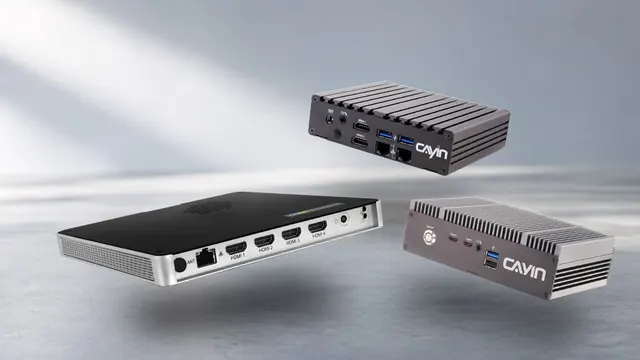
- Players: the small computer that stores and plays the content. A dedicated player such as a CAYIN SMP player drives one to four screens; Smart TVs, tablets and PCs can also play content through an app.
- Management software: where you upload content, design layouts, set schedules and monitor screens. CAYIN offers SMP signage software built into every SMP player, CMS-SE and CMS-WS servers, and the GO CAYIN cloud platform.
- Content: videos, images, web pages, menus, news, weather, meeting schedules and live data.
- Network: a wired, Wi-Fi or 4G connection that lets you update players remotely. Players keep playing stored content when the network drops.
Why not just plug a USB stick into a TV?
Many people start by copying a video to a USB stick and plugging it into a TV. For one screen with content that changes every few months, that can be enough. The problems start when you need to change content often, run more than one screen or know that every screen is working:
| USB stick in a TV | Digital signage | |
|---|---|---|
| Updating content | Someone walks to every screen to swap the USB stick | Upload once and send it to every screen from one place |
| Scheduling | Plays the same loop all day | Different content by time of day, day of week or location |
| Several screens | Each TV plays on its own, out of sync | One player can drive several screens in sync, or a video wall |
| Layout | One full-screen video or slideshow | Split screens with video, text, web pages and live data |
| Screen status | You only find out a screen is off when someone sees it | Check status remotely and get alerts |
| Power on and off | Turned on and off by hand | Screens switch on and off on a schedule |
| Proof of play | No record | Playback reports for advertisers and head office |
| Security | Anyone can unplug the USB stick or press the remote | Players are locked down and managed with accounts and permissions |
A simple rule: if you have more than one screen, change content more than once a month, or need different content at different times, digital signage saves time and avoids blank or outdated screens. USB still has a place: CAYIN SMP players can also be updated with a USB drive at sites with no network.
What are the benefits of digital signage?
- Update instantly: change prices, menus or notices across every location in minutes, with no printing.
- The right message at the right time: breakfast menus in the morning, promotions in the afternoon, different content for each store.
- More attention: video and motion catch the eye better than printed posters.
- Live information: show web pages, news, weather, queue numbers or meeting schedules automatically.
- Less work: one person manages hundreds of screens from a browser.
To plan content by time and place, see Digital Signage Scheduling: Send the Right Message at the Right Time.
What is the difference between on-premise and cloud digital signage?
On-premise digital signage runs the management software on your own server or on the player itself, so content and data stay inside your network and it works without the internet. It suits enterprises, government, healthcare and sites with strict IT rules.
Cloud digital signage runs the software on the provider’s servers. You need no server of your own, only a stable internet connection, and usually pay a subscription. It suits small businesses and teams that want to start quickly.
CAYIN offers both: SMP players with CMS-SE or CMS-WS servers on-premise, and the GO CAYIN cloud platform. For a full comparison, see Digital Signage Software: Cloud vs On-Premise Compared.
Where is digital signage used?
- Retail: promotions, new products and prices that change by store and season.
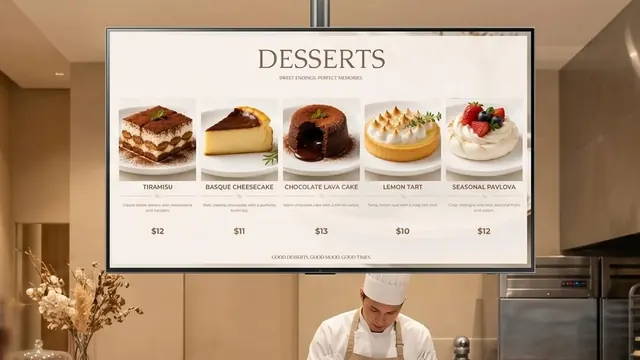
- Restaurants: digital menu boards that switch between breakfast, lunch and dinner.
- Corporate: lobby welcome screens, internal communication and meeting room schedules.
- Healthcare: queue numbers, wayfinding and health information.
- Education: campus news, timetables and emergency notices.
- Transportation: timetables, and screens on buses that change content by GPS location.
- Hotels and venues: event schedules, wayfinding and video walls.
See how each industry uses it in our industry solution guides, or browse customer stories.
Digital signage and DOOH: what is the difference?
DOOH (digital out-of-home) is digital signage used as an advertising medium: screens in public places outside the home, such as metro stations, airports, malls, elevators and buses, that play brand ads and sell ad slots. Every DOOH screen is digital signage, but not all digital signage is DOOH; a menu board or a lobby screen shows your own content, not paid ads.
DOOH networks put more weight on three things: scheduling ads by time slot and location, managing large numbers of screens spread across many sites, and proving to advertisers that each ad actually played.
With CAYIN, SMP players and a CMS-SE server schedule content across thousands of screens, and SuperReporter produces playback reports as proof of play.
How much does digital signage cost?
There is no single price, because a system is made of parts you choose. The cost depends on:
- Screens: size, number and whether you need touch or video walls.
- Players: one player can drive several screens, so you may need fewer players than screens.
- Software: a one-time purchase or a monthly or yearly subscription.
- Content: producing videos and graphics yourself or with an agency.
- Installation and network: mounting, cabling and connections at each site.
With CAYIN SMP players, the signage software is built in with no subscription, and a CMS-SE server is a one-time purchase. The GO CAYIN cloud platform is subscription-based.
How do I get started with digital signage?
- Set your goal: sell more, inform visitors, cut printing or improve internal communication.
- Count screens and locations: how many screens at each site, and where they will be mounted.
- Choose on-premise or cloud: based on your IT rules, network and number of sites.
- Choose players: match the number of screens, outputs and resolution. See How to Choose a Digital Signage Player.
- Plan content and schedules: start with a few templates, then add schedules and live data.
Not sure which products fit? Try the Player Selection Guide and the Server Comparison Guide.
Frequently asked questions
Is digital signage the same as an electronic sign or a digital display?
Yes, these terms usually mean the same thing: screens that show content managed by software. Digital signage is the most common industry term.
Can I use a regular TV for digital signage?
Yes. A TV can show digital signage when it is connected to a signage player or runs a signage app. For screens that run for long hours every day, many businesses choose commercial displays.
Does digital signage need an internet connection?
Not always. On-premise players such as CAYIN SMP players store content and schedules locally and keep playing without the internet. They can be managed on the local network or updated with a USB drive. Cloud platforms need an internet connection to update content.
How much does a digital signage system cost?
It depends on the number and size of screens, the players, the software licensing model, content production and installation. CAYIN SMP players include signage software with no subscription, while cloud platforms are usually subscription-based.
What digital signage products does CAYIN offer?
CAYIN offers SMP digital signage players, CMS-SE and CMS-WS content management servers, the GO CAYIN cloud platform, ePaper signs and software for meeting rooms, queuing and reports. CAYIN serves more than 1,000 brands, with more than 50,000 players deployed in over 110 countries.
CAYIN Technology in Brief
CAYIN Technology is a 22-year professional digital signage solution and software developer from Taiwan. By offering a complete portfolio of appliance-based digital signage solutions, CAYIN dedicates itself to being a reliable partner to clients worldwide and has successfully set up various applications globally. In order to best facilitate the deployment of its products, the company also provides tailored services to satisfy the ever-growing market demand for almost limitless applications.